Lucy - Technical Design

In this page I will be looking at the development I have acheived in regards to technical skills and their relevance to the overall documentary, including promotional material. I will be focusing on the use of the 450D and the Adobe Photoshop RAW editing software.

Training on the Canon EOS 450D SLR Camera

SLR - Single Lens Reflex
AF - Auto Focus
M - Manual

ISO - International Standard Organization

 ISO Speed 

100/200 -
400/800 -
1600 -

  Flash Range 

  'Spanish film'-direct light, sunny outdoors
  'UK film'-scattered light, overcast, evening
  'Dawn till dusk'-night or dark indoors

  • The higher the ISO speed, the further the flash range will be
  • The higher the ISO speed, the more pixels a picture would have
  • The higher the ISO, the more shots are available, but it would equal less quality
  • The RAW Image Recording setting gives better quality and is an industry standard editing package. (Adobe Photoshop has RAW editing package.) RAW images must be used when images are put into a documentary for U-Doc. Low quality JPEG's will become pixelated when enlarged and projected onscreen.

White Balance
White balancing basically tells the camera what is 'true' light on location, but there is no true light. Auto WB works well, but if not the seperate RAW images used holds all data and holds all 'original' data, even if the setting is on a different white balance, e.g. White Fluroscent.

P Mode
'Portrait mode' - gives the photographer control of the flash, balances light on each person in the frame.

TV Mode
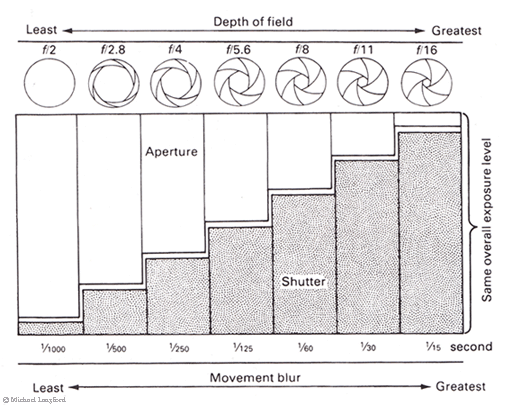
Shutter priority mode. 1/4000 (4000th of a second shutter speed) lets picture in but controls the movement. (4000th of a second is good for action.) Camera controls aperture.
Having a shutter speed of 1/30 and below i.e. 1/15,1/8 etc can pick up movement and create a slight blur to the image. Any shutter speed under 1/30 means that the camera should be on a tripod to lessen any movement given by photographer or wind.
Usually, 1/25 refers to movement of at least 5mph.

AV Mode
Aperture priority mode.Changes and controls depth of field. Camera controls shutter speed.
The higher the aperture, the sharper the picture will look with a wider depth of field. The smaller the F-number, the thinner the depth of field.
F2.8: only subject is in focus, back/foreground not in focus.
F8.0-F12: medium depth of field, usually focus on back/foreground, subject out of focus.
F25: allows for movement.
F32: Larger aperture, most subjects in focus. High depth of field.

The smaller the aperture, the larger the number, the more area is in focus.
The larger the aperture, the smaller the number, the less area that is in focus.
 

On Auto, the camera tries to take the most balanced picture, considering aperture, shutter speed, lighting, focus etc.

M Mode
Manual exposure mode, used when lighting in a photograph is too difficult for the 450D light meter.

In P, TV and AV Mode, the camera tries to control the balance. Only on Manual Mode is there full control over the camera, but it could cause conflict with the aperture and shutter speed. On Manual Mode, there is a bulb setting that controls the shutter.

Continuous Shooting
Uses up memory on the camera. Processes all pictures a little slower than usual. Can capture decisive moments when/if needed.

When taking images with the 450D, it was important to note that we had to make sure there was a JPEG + RAW file that was being taken. This was becuase in the edit of the photo essay, for example, there is a specific programme on Adobe Photoshop that allows you to easily edit and manipulate your chosen image. Below is a guideline to how I edited a photograph in the Photoshop RAW editing software:

So, it is clear to see in this image that the contrast and over exposure of the sky needs to be edited. However, along with this I would also like to add in more colour to the picture, such as making the greens in the left and right third of the image bolder, so it acts as some part of a frame for the central image. I would also like to increase the background colours - the oranges, yellows and greens in the distance. Because they are central in the image this would also emphasise the visual in the central third.

You can see that I have decreased the exposure (outlined in red) to -0.70, which in fact increases the colours in the picture.

In this edit, I have changed the Blacks to 32, increased the Brightness to +95, increased the Contrast to +52, and also increasted the Clarity by +10, the Vibrance to +20 and finally decreased the Saturation by -8. All of these changes added up to an image that now has more colour - and the shadows are emphasised, especially below the fountain, in the central focal point.

Here, I have concentrated on the Hues. I changed the Reds to +96, Oranges to -24 and Yellows to +45 which increased the colour of the trees in the background, Greens to +48 and Blues to +8. This gave a little bit of colour to the trees and helps the process of making the background bolder than the foreground.

To reinforce the background colours and the greens in the trees, here I concentrated on the Luminance. Also take note that the red car (center, off to the right a bit) and two red coats on either side of the image are becoming slightly less bolder than in the original picture. This is good and something I aimed to do to keep the unnecessary colours out of the interest to the viewer, emphasising the interest to the focal point and the background colours. In this edit, I changed the Reds to -40, Oranges to +62, Greens to +72 and Blues to -38. This edit then became more of an edit to get the greens and the oranges in the background to stand out more than the blues in the foreground, so that is why I decreased the Blues so much in this part of the edit.

In this final part of the edit, I focused on the Luminance of the colours, especially the Reds and Greens. I upped the Reds to +34, which made the red car and red coats less visible to the viewer, I decreased the Oranges by -10, which in fact increased the boldness of the oranges in the background and I also increased the Greens to +60, which makes the grens in the trees either side of the frame 'pop' out, forming an almost frame around the central point.

All in all, I acheived what I set out to do - make the background colours and the greens more emphasised - but the sky is still rather over exposed. However, I think this contrasts well with the greys and blues of the road and the creams and light oranges of the buildings either side of the image.

Overall then, I find editing in the RAW editing software on Photoshop gives a much better quality as well as a higher choice of what and where you would like to edit in your image.

This video (screencapped on the right) was helpful to me to understand depth of field, aperture, background lighting and other camera techniques, backing up and reinforcing what we had previously learnt in the lecture. It was also helpful to understand because they put what they were trying to put across in simple terms. 


This free website was made using Yola.

No HTML skills required. Build your website in minutes.

Go to www.yola.com and sign up today!

Make a free website with Yola